Is this something we should be looking at to create a nicer looking disk image interface? This is for the macOS builds.
This is an older version of DMG Canvas, but I think it works the same

I can’t deny - it’s definitely nice to have 
That said, I’ve developed a bit of a “special relationship” with my setup over the years. Back when I was working as a macOS system admin, I often had to reinstall macOS from scratch (no upgrades, the full clean slate experience).
Then anything in the main Applications folder would vanish into the drain.
So I started keeping my apps in an Applications folder inside my home directory instead. That way, I could just copy over my home folder and all my apps came along for the ride (App Store Apps also auto update there  ).
).
A small victory for laziness… I mean, efficiency
Of course, that’s just my slightly quirky workflow. For normal humans, this feature is probably a very nice benefit!
That said, if you’re considering options, maybe routing it through Sparkle auto-update could also be worth a look?
1 Like
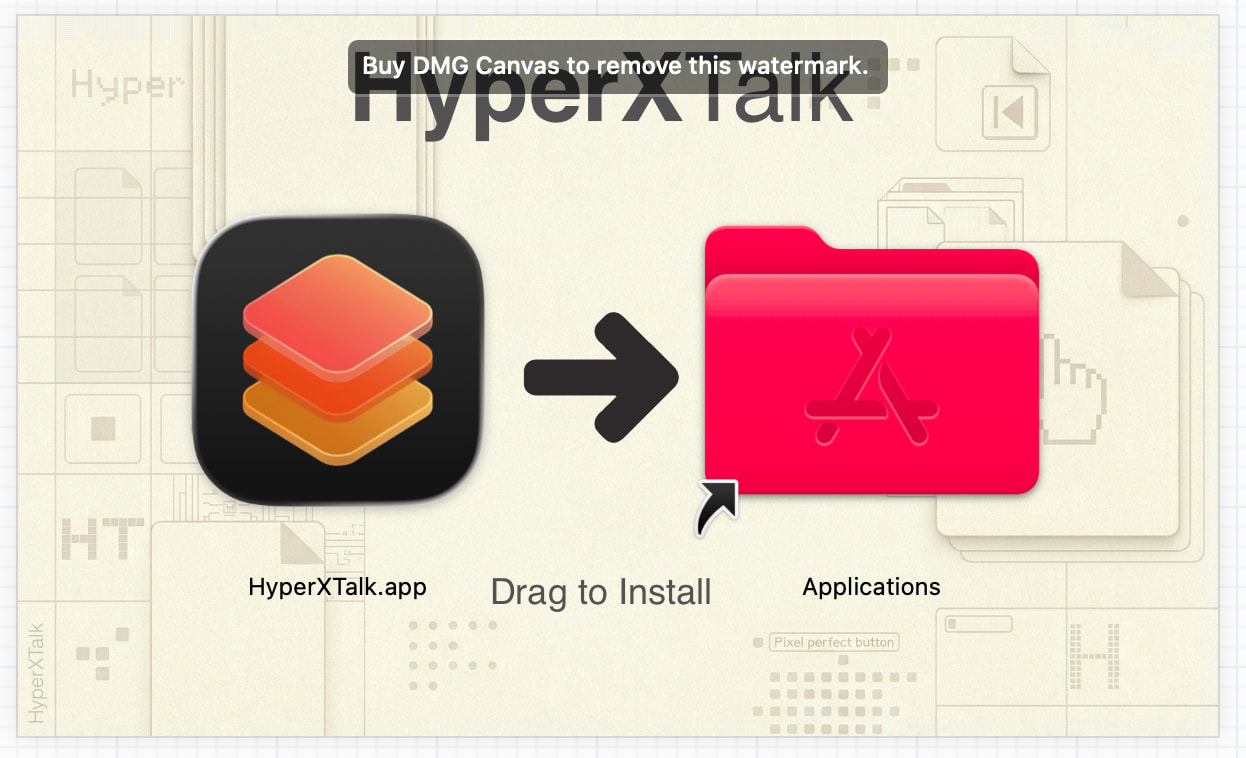
Looks great with the icons, but the Applications folder should be blue; otherwise, it doesn’t match other drag-and-drop installers and might scare some people.
That’s the default colour on my macOS Tahoe installation, hopefully it shows up in the end user’s colour
I don’t think it will. DMG normally respects colored labels - you’ll probably have to remove the red color when creating the DMG and set it back to red afterward. I know it’s unpleasant  .
.
It’s not a label, it’s the default colour of my folders. When I set a label, the folder changes to that colour. I’ll make a test DMG and can someone check to see if the folder is still red or their default colour?
Of course send me that thing 
I can then see it in real life and adjust the arrow and the text at the bottom. I think the text could be a bit bolder than my first attempt - just needs a touch more confidence 
Okay, it’s been emailed to you